App Preview vs Screenshots: Which Converts Better? (2026)
TL;DR. There is no universal winner. Whether an app preview video beats screenshots depends almost entirely on your app's category and how good the video is. Vendor studies report a +15% to +30% install lift from a strong preview, but Apple's own Product Page Optimization page documents a real case (Simply Piano) where the screenshots-only page beat the version with a video, and a low-quality video can cost 10% to 15% in conversion. Games, social, and visually animated apps tend to gain from video. Utilities, dev tools, and productivity apps usually do not. For most indie devs, nailing your screenshots first (which is also where the video's poster frame lives) is the higher-ROI move.
Last updated: 2026-08-15.
Disclosure. This article is published by ScreenFast, an AI App Store screenshot generator. ScreenFast makes static screenshots, not app preview videos, so we have a stake in the screenshots side of this comparison. We have tried to represent the video data honestly in both directions, including the cases where video clearly wins. Every Apple spec is cited to developer.apple.com and every conversion figure to its named source.
What an app preview video actually is (and how it behaves on the Store)
An app preview is a 15 to 30 second video. It sits in the same gallery as your screenshots on the product page, and in search results too. It is not a trailer in the marketing sense. Per Apple's app preview guidelines, "app previews must show only content within the app itself. Don't film people interacting with a device." It has to be real captured app footage.
Two behaviors decide whether a preview helps or hurts, and most developers do not plan for either.
First, it autoplays muted. Apple states plainly: "By default, app previews play with the sound muted." Your video has to work as a silent film. Captions, motion, and on-screen contrast carry the message, not narration.
Second, the poster frame does a lot of the work. If a user has turned off autoplay, Apple shows a static poster frame instead, and even when autoplay is on, many users glance and scroll before the video gets going. AppScreenStudio puts it bluntly: "if this frame is a black screen or a random UI state, your click-through rate will tank." Your poster frame is, functionally, a screenshot. That is the first place these two assets overlap.
The mixed conversion data: video helps in some cases, hurts in others
This is the part most "vs" articles get wrong by cherry-picking the upside. The honest picture is mixed.
The upside is real and frequently cited. yellowHEAD summarizes vendor studies as "adding a well-optimized preview video can lift install rates by 20-30%." SplitMetrics, StoreMaven, and AppScreenStudio all land in a similar +15% to +30% band. Adapty's 2026 conversion model lists +15% to +25% for a video preview. Treat these as directional vendor estimates, since each company sells into this market.
The downside is just as real, and almost nobody cites it. Apple's own Product Page Optimization documentation describes a Simply Piano test where, in Apple's words, "the original product page without an app preview video outperformed the treatment, contrary to the developer's hypothesis." The screenshots-only page won. Independent guides report that a weak video "can decrease conversion by 10 to 15% compared to no video at all." SplitMetrics documents the mechanism: "the autoplay feature raises the number of users who explored the video variation, but visitors might leave the page afterwards, if the video doesn't seem engaging." Video pulls attention; if it does not pay that attention back fast, it costs you the install.
The first three seconds decide everything. AppFollow: "the first three seconds carry disproportionate weight." Videos that open on a logo or a loading screen lose most viewers before the value lands.
Screenshots still carry the decision. AppScreenStudio cites that "80% of users make install decisions based on screenshots alone," with most users viewing three to four screenshots before deciding. That reframes video as a supplement to strong static creatives, not a replacement for them. If you only have time for one, the data says make it the screenshots.
Apple's 2026 app preview specs (what you are signing up to produce)
If you decide to make one, here is exactly what Apple requires, quoted from the App Preview Specifications and App Previews overview.
- Count: "You can deliver up to 3 app previews" per localization (per language).
- Length: 15 seconds minimum, 30 seconds maximum.
- iPhone resolution (6.9", 6.5", 6.3", 6.1" displays): 886 × 1920 portrait, or 1920 × 886 landscape.
- iPad resolution (13", 12.9", 11", 10.5"): 1200 × 1600 portrait, or 1600 × 1200 landscape.
- File format: .mov, .m4v, or .mp4. Codecs: H.264 (target 10 to 12 Mbps) or ProRes 422 HQ.
- Poster frame: the default poster frame is taken at the 5 second mark. Override it with a deliberately chosen frame.
- Content rule: app footage only, no hands or over-the-shoulder filming.
The practical reading: a preview is a real production task with device-specific renders, not a one-click export. Compare that to a screenshot set, where a single 1290 × 2796 master auto-scales across iPhone sizes (see App Store screenshot sizes and the 1290x2796 master).
When an app preview video wins (and by how much)
Category is the strongest predictor. AppFollow's 2026 directional lift ranges by category line up with what AppScreenStudio sees in practice.
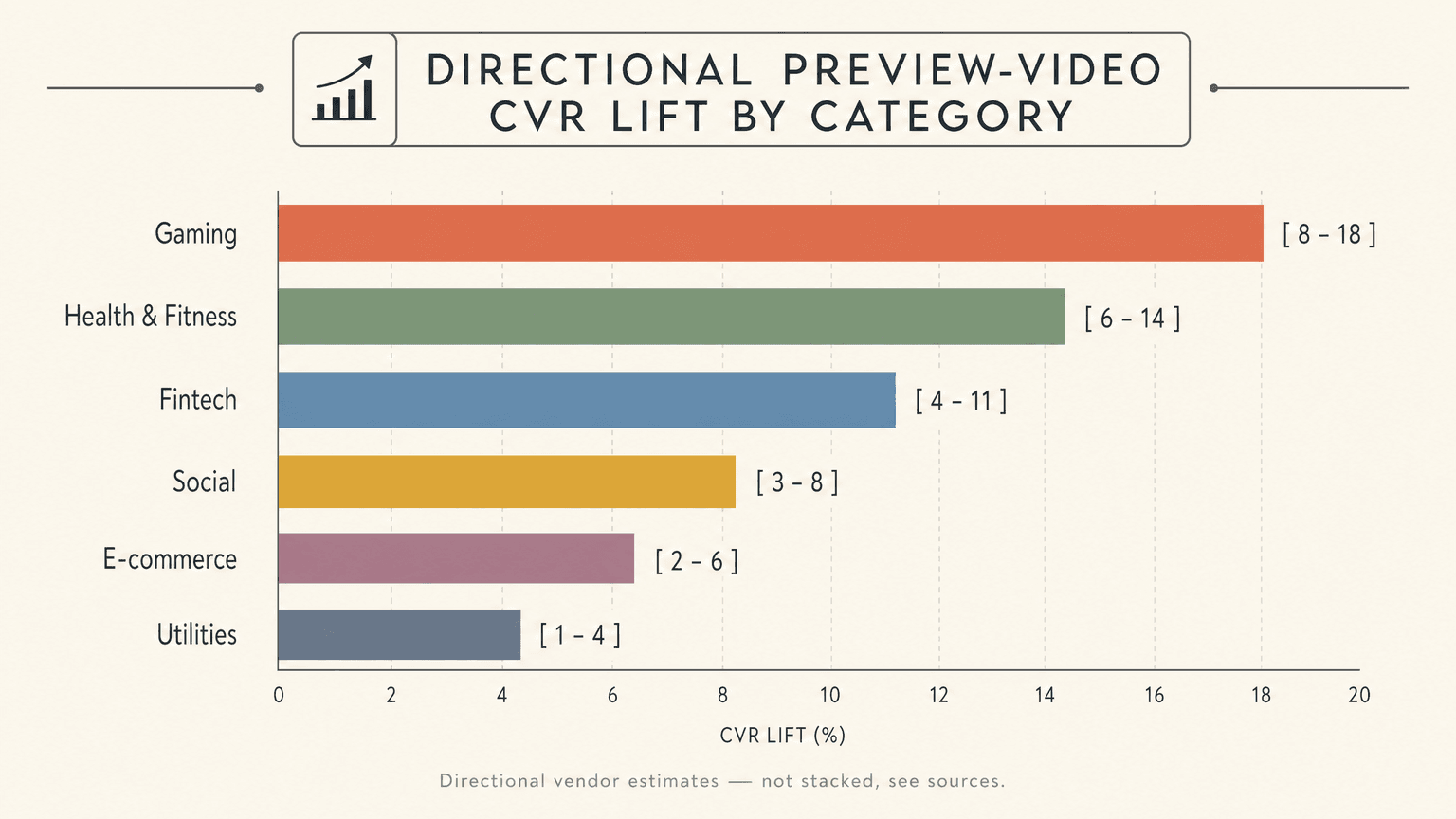
- Gaming: +8% to +18%. Gameplay is motion. A still cannot show a combo, a physics moment, or a level transition. AppScreenStudio reports "game listings with preview videos see 15 to 25% higher conversion rates."
- Health and fitness: +7% to +14%. Guided workouts, form demos, and progress animations read better in motion.
- Fintech: +6% to +12%. A short flow (send money, see it land) can build trust faster than a static panel.
- Social: +5% to +11%. The feel of the feed and interactions is hard to freeze.
- E-commerce: +4% to +10%. Browse-to-checkout flow demos help, but screenshots already do a lot here.
- Utilities: +3% to +9%. The smallest gain, and the most likely to go negative if the video is weak.
The pattern: the more your app's value is an experience that unfolds over time, the more a video earns its place. Also worth knowing, Apptamin found that "in the majority, two short app previews focusing on two different features performed better than a single 30-second video." If you make videos, make two tight ones, not one long one.
When screenshots win (and video is a waste of your time)
For a large share of apps, a video adds production cost and conversion risk without a reliable payoff.
AppScreenStudio is direct about it: "if your product is a background utility, a database tool, or a developer API with minimal visual flair, a high-production video often adds friction rather than clarity." Screenshots are sufficient for weather apps, calculators, notes, productivity tools, and most lifestyle and e-commerce listings, where the value is communicated fine by a strong first screenshot and a clear feature sequence.
This is also the safer default because the failure mode is asymmetric. A great screenshot set has a floor. It informs even when it does not delight. A mediocre video has a trapdoor. The Simply Piano case and the 10% to 15% downside figure show that adding video can actively lose you installs. When you are unsure, the lower-variance asset is screenshots.
If your screenshot ordering is not dialed in yet, that is the first thing to fix. The lead frames carry the conversion weight, covered in which screenshot position drives installs, and you can settle it with data using how to A/B test on App Store PPO.
The production cost reality: time, money, and ROI
This is the section the video-selling guides skip.
A screenshot set is hours, not days. With an AI generator you get a full set of designs in minutes; even by hand in Figma it is a few hours. A genuinely good app preview video is a different order of effort. You script the 15 to 30 seconds. You capture clean app footage, often via the iOS Simulator plus QuickTime. You edit with captions that survive muted autoplay. You choose a poster frame and render per device family. Realistically that is a full day minimum for one good video, more if you outsource and manage revisions.
So the ROI question is not "does video ever help" (it can). It is "does this video, in my category, beat what the same day of work would do for my screenshots, my keywords, or my product." For a game, the video often wins that contest. For a utility at +3% to +9% upside with real downside risk, the same day is almost always better spent elsewhere.
A pragmatic sequence for a budget-constrained indie: ship a strong screenshot set, run a conversion benchmark check to see where you stand, and only then decide whether a video is the next-best dollar. If you do make a video, Apple AppStore ASO Tips: How to create a video preview (Code with Karma, April 2025) walks through the capture-and-upload flow.
App preview video vs screenshots: side-by-side comparison
| Dimension | App preview video | Screenshots |
|---|---|---|
| Production effort | A full day minimum (script, capture, edit, per-device render) | Minutes (AI) to a few hours (Figma) |
| Up-front cost | Higher (tools, possibly an editor) | Lower; one master auto-scales |
| CVR impact | +8% to +18% for games; can be negative for utilities or weak videos | Reliable floor; first 3 carry ~70% of the decision |
| Risk | Asymmetric: a weak video can lose 10% to 15% | Low downside |
| Localization | Re-edit and re-render per language | Re-render the image text per language |
| Where they overlap | The poster frame is a still image | The poster frame is essentially one of your screenshots |
The honest decision framework: video, screenshots, or both?
A simple flow beats a blanket rule.
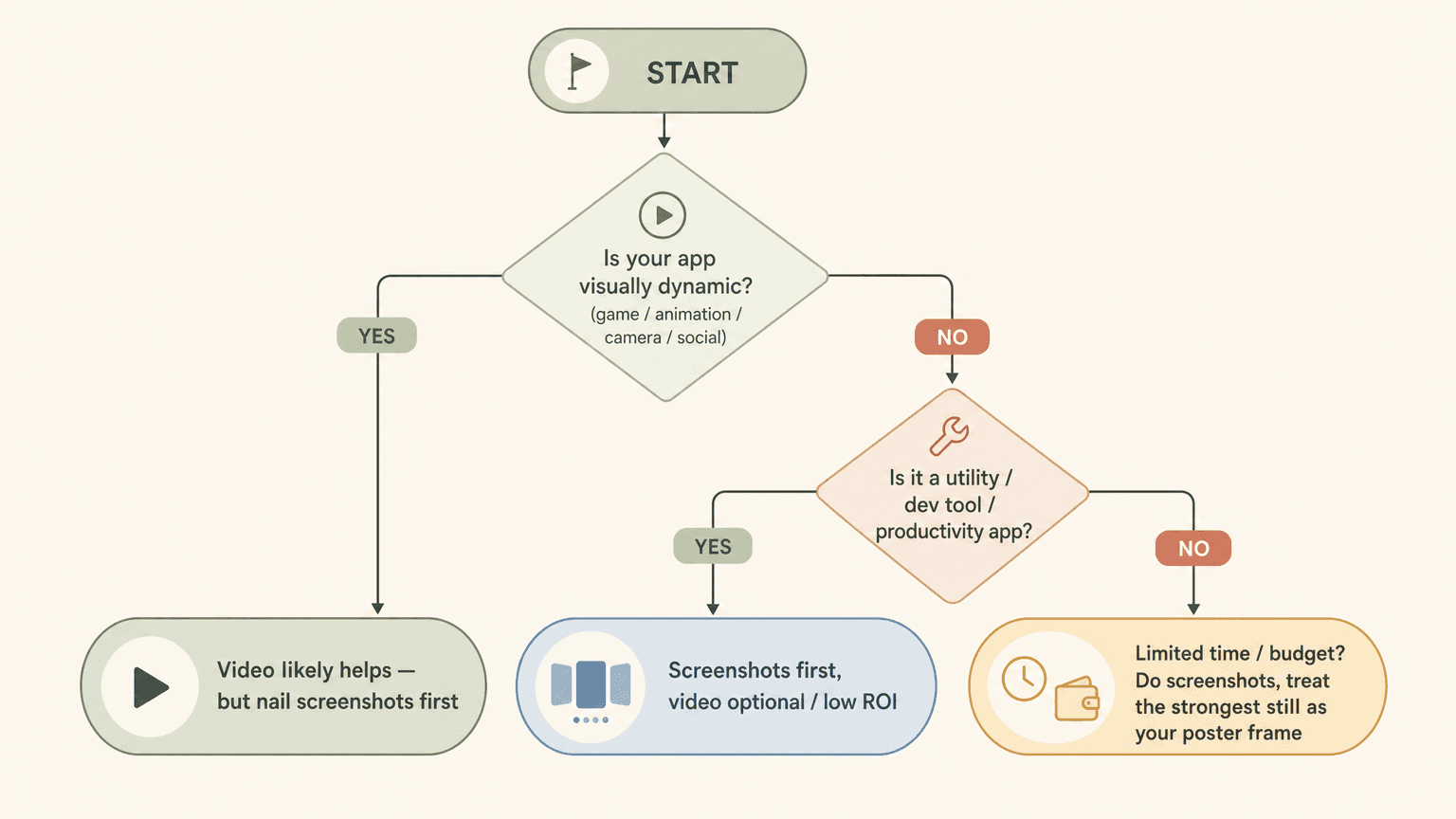
- Is your app visually dynamic (game, animation, camera, social)? If yes, a video likely helps, but nail your screenshots first because most of the decision still happens there.
- Is it a utility, dev tool, or productivity app? Screenshots first. A video is optional and usually low ROI.
- Are you time or budget constrained? Do the screenshots, and treat your single strongest still as the poster frame you would have used anyway.
In all three branches, screenshots come first. Video is the second move for the apps that earn it, not the first move for everyone.
How we tested
Conversion figures are quoted from named sources with their commercial stake noted: vendor studies via yellowHEAD, AppScreenStudio, AppFollow, SplitMetrics, and Apptamin. The single most important counter-data point, that screenshots-only beat a video in a real test, is from Apple's own Product Page Optimization page (the Simply Piano case). Every spec is from Apple's App Preview Specifications and App Previews overview.
We did not fabricate Reddit quotes. Reddit is not retrievable through our research tooling, so rather than invent indie-dev voices, we left them out.
ScreenFast, which publishes this article, makes static screenshots rather than videos. It starts with an App Store URL or prelaunch uploads, shows a personalized audit, then unlocks ten design directions for $9.99 one-time. Our stake is therefore on the screenshot side of this comparison, and the limitation is disclosed openly. If your next move is the screenshot set, see the App Store screenshot generator workflow or check ScreenFast pricing.
FAQ
Do app preview videos increase downloads?
Sometimes. Vendor studies report +15% to +30% for a strong video, and the lift is largest for games, social, and visually dynamic apps. But Apple's own documentation shows a case where screenshots-only beat a video, and a weak video can reduce conversion by 10% to 15%. It depends on your category and the quality of the video.
How long can an App Store preview video be?
15 to 30 seconds, per Apple's specifications. You can deliver up to 3 previews per language. In practice, two short, focused previews often outperform one long one.
What is a poster frame and why does it matter?
The poster frame is the static thumbnail Apple shows before autoplay starts, and the image shown to users who have autoplay turned off. Apple's default takes it at the 5 second mark, but you should choose it deliberately. A weak poster frame tanks your click-through rate, which is why it is essentially one more screenshot to get right.
Should a utility or productivity app make a preview video?
Usually not. The directional lift for utilities is the smallest (+3% to +9%) and the downside risk is real. Screenshots communicate a utility's value efficiently, and the time a video would take is almost always better spent elsewhere.
Do preview videos play with sound?
No. Apple states app previews "play with the sound muted" by default. Design for silent autoplay: captions, motion, and contrast over narration.
Is it better to invest in screenshots or a video first?
Screenshots first, in almost every case. About 80% of install decisions are reported to happen on screenshots alone, the first three carry most of the weight, and screenshots are the lower-risk, lower-cost asset. A video is the second move for apps whose value is an experience that unfolds over time.
Can ScreenFast make my app preview video?
No. ScreenFast generates static App Store screenshots, not videos. It is useful for your screenshot set and, by extension, for designing the still you use as a video poster frame, but the video itself you capture and edit separately.