App Store Screenshot Tools for Agencies: A Buying Guide
TL;DR: buy the delivery workflow, not just the template
The best app store screenshot tools for agencies pass three tests: you can legally use them for paid client work, the client can approve the correct version, and someone can maintain the files after handoff. AppScreens Scale is worth examining for repeated store exports. Figma is worth examining for editable design systems. Neither removes the need for a written scope and a final accuracy review.
Disclosure: ScreenFast is our product. We include it for paid AI design concepts, not as a full agency platform. Last updated: 2026-10-17.

Start with the contract you need to fulfill
An agency is not buying the same thing as an indie developer making one listing. You need a process that works for different clients. Several people may review each set. The client also needs usable files when the job ends. A low monthly price does not answer those questions.
Write the delivery promise before choosing the software. For example: six screenshot frames, two device-size sets, English and German, one agreed visual direction, two revision rounds, and a final folder of exported images. Then state whether editable source files, store upload and later app updates are included.
That example contains 24 final images: six frames multiplied by two size sets and two languages. It is a scope calculation, not a recommended screenshot count or a vendor performance benchmark. Adding another locale changes the delivery work even if the editor charges nothing for another export.
Separate three layers in your proposal:
- Creative work: messaging, composition, typography and the choice of real app screens.
- Production work: device sizes, language variants, file naming and export checks.
- Operational work: approvals, permissions, delivery, upload and later revisions.
A template tool may cover much of production but little of approval management. A flexible design file may cover the creative layer well while leaving export administration to your team. Price the missing work explicitly.
The shortlist: choose by the constraint that costs you time
The table below describes starting points, not an overall ranking. We checked public product and licensing pages; we did not run a paid multi-client production trial.
| Option | Agency use worth evaluating | Important boundary | What to test before standardizing |
|---|---|---|---|
| AppScreens Scale | Repeated store screenshot production across client apps | Paid client work requires the appropriate Extended licence; Pro is not interchangeable | Client review, project ownership and your exact export matrix |
| Figma | Bespoke visual systems and editable design handoff | Seat cost and permissions are separate from stock-asset rights | Client edit access, fonts, components and export instructions |
| Canva | Teams already maintaining a wider marketing asset library | Content licensing and third-party app terms still apply | Template transfer, paid elements and repeat export access |
| AppLaunchpad | Store-specific template production | A large project allowance alone does not establish client licensing or collaboration rights | Written rights confirmation, reviewer workflow and source handoff |
| ScreenFast | Paid AI concepts for a client's initial screenshot direction | Not presented here as a white-label portal or role-based agency workspace | Output accuracy, edits and the client's required delivery format |
If your main tradeoff is store automation versus a bespoke design file, use the detailed AppScreens vs Figma comparison. If you already work in Canva, the AppLaunchpad vs Canva comparison focuses on the difference between a store-specific editor and a broader campaign toolkit.
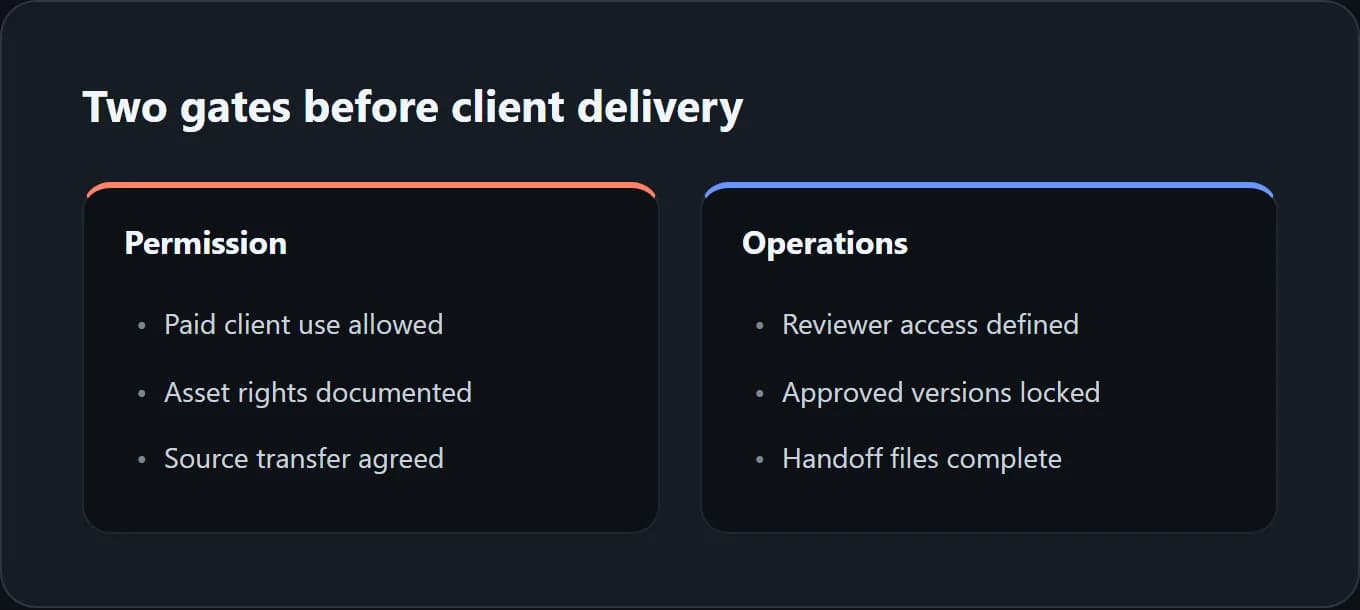
Gate one: confirm the licence covers paid client work
Commercial use is not one universal permission. A licence might permit your own business marketing but exclude creating assets for another company for a fee. It might allow exported images while restricting resale of editable templates. Read the actual terms, not just a pricing-card checkmark.
AppScreens makes this distinction unusually explicit. Its licence page separates Free, Standard and Extended licences. Standard covers the licensee's own organization; Extended includes paid client work. The current pricing page places the Extended licence on Scale.
At the annual option checked for this guide, Scale costs $180 per year, displayed as $15 per month billed yearly. Pro costs $99 per year, displayed as $8.25 per month billed yearly. Those annual equivalents are not month-to-month offers. Pro currently allows 50 saved projects and 10 apps, while Scale lists unlimited projects and apps. A cheaper plan with enough project slots is still the wrong purchase if its licence does not cover the engagement.
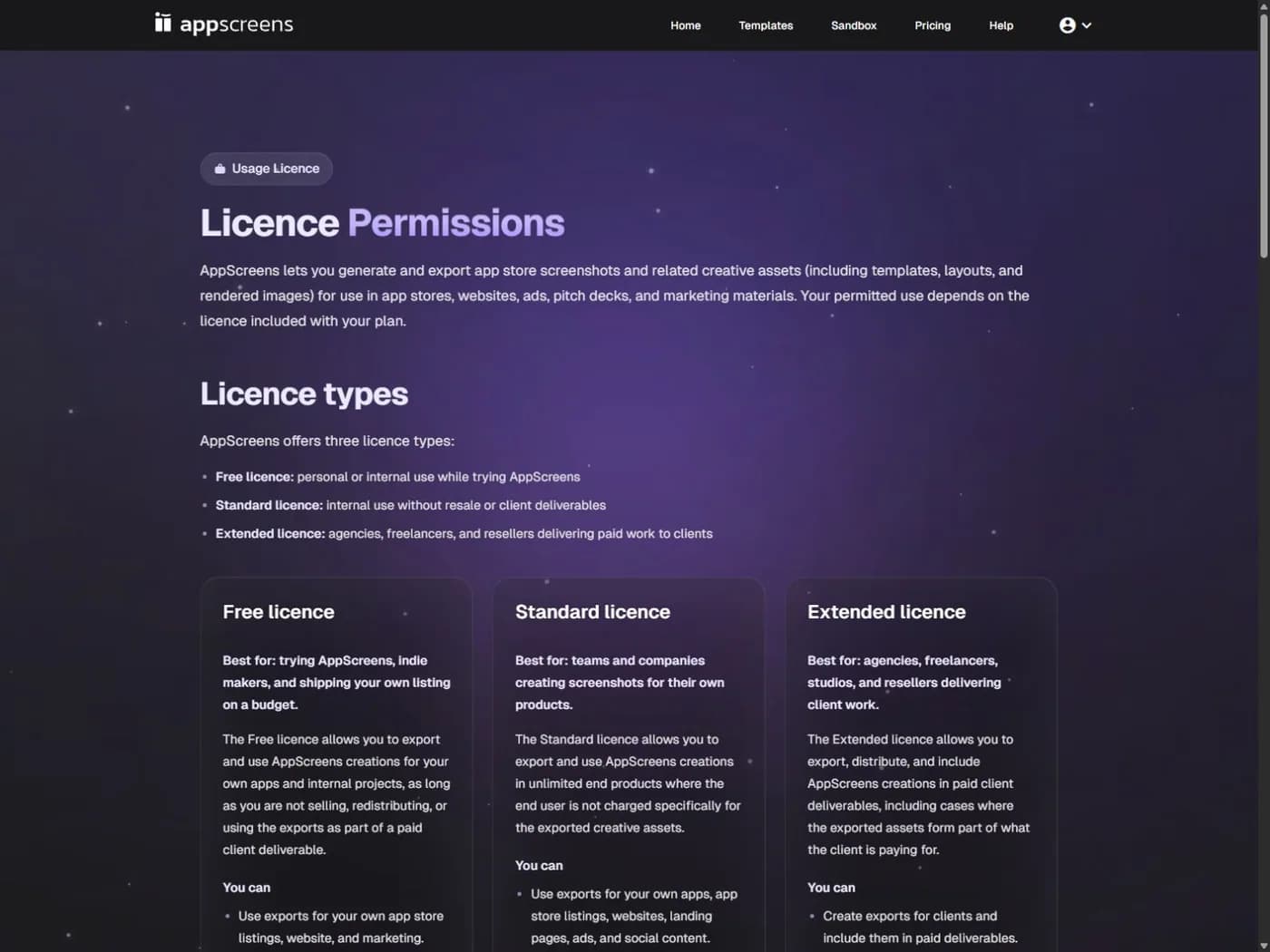
Official licence page captured on 2026-10-17. Check the current terms before committing to a client contract.
For Canva, review the content licensing explanation alongside the assets used in the actual design. Do not assume that handing over a flattened image, transferring an editable design and selling a reusable template have identical rules. A client's own logos and screenshots also need a clear permission trail.
Keep a short rights record per project: tool and plan, date checked, relevant terms, purchased fonts or stock assets, and any written vendor clarification. This is an operational checklist, not legal advice. Ask qualified counsel if your agreement depends on an unclear resale or redistribution right.
Gate two: make approval refer to one exact version
An approval message is useful only if everyone knows what was approved. A client saying "looks good" in a chat is ambiguous when there are three similar exports and a translated caption in another thread.
Use one release identifier for each review batch, such as client-app-2-4-review-03. Put it in the review document and delivery folder. Record the app build used for the UI captures, the locale, the intended store listing and the device-size group. These details let a reviewer distinguish a layout change from a product change.
Ask reviewers to check different things at different times. The product owner checks whether features and UI are accurate. The brand reviewer checks visual consistency. A fluent language reviewer checks translated claims and line breaks. The release owner confirms that the final export matches the approved version.
This division does not require an expensive approval platform. It does require someone to own the final decision. If the screenshot editor has comments, verify whether an external client can use them without buying an editing seat. If it does not, use a separate review document and make the version link explicit.
Gate three: decide what editable handoff actually means
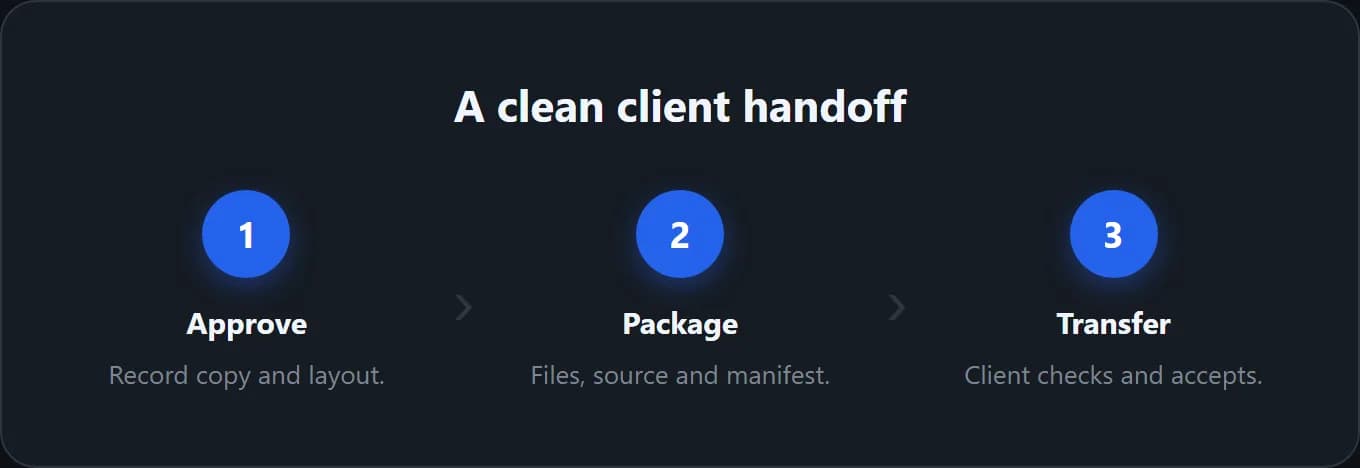
"Source files included" can mean very different things. It could mean a Figma file with organized components, a link to a hosted editor project, or a folder containing only the original app captures. Spell out which one the client receives.
For a Figma handoff, include font names, component structure, export settings and a short update guide. Confirm that the receiving account can open and edit the file as intended. A source file that depends on unavailable fonts or unexplained plugins can create more work than it saves.
For a hosted screenshot tool, test the ownership path. Can you transfer the project? Must the client keep a paid plan? Can they export the same sizes after your plan ends? If the public docs do not say, ask the vendor. Get a written answer before you promise a transfer.
For AI-assisted concepts, distinguish finished images from editable layers. Do not sell a layered, fully editable design handoff unless your actual production workflow creates it. ScreenFast's paid generation can help explore directions, but that does not establish a Figma source-file deliverable or a client permissions system.
Compare annual software cost with repeat-release work
Figma's pricing page lists a Professional Full seat at $16 per month when billed annually at the option checked here. That is $192 per year for one Full seat, before any applicable taxes. A lower-priced collaboration or developer seat is not the same product as a Full design seat.
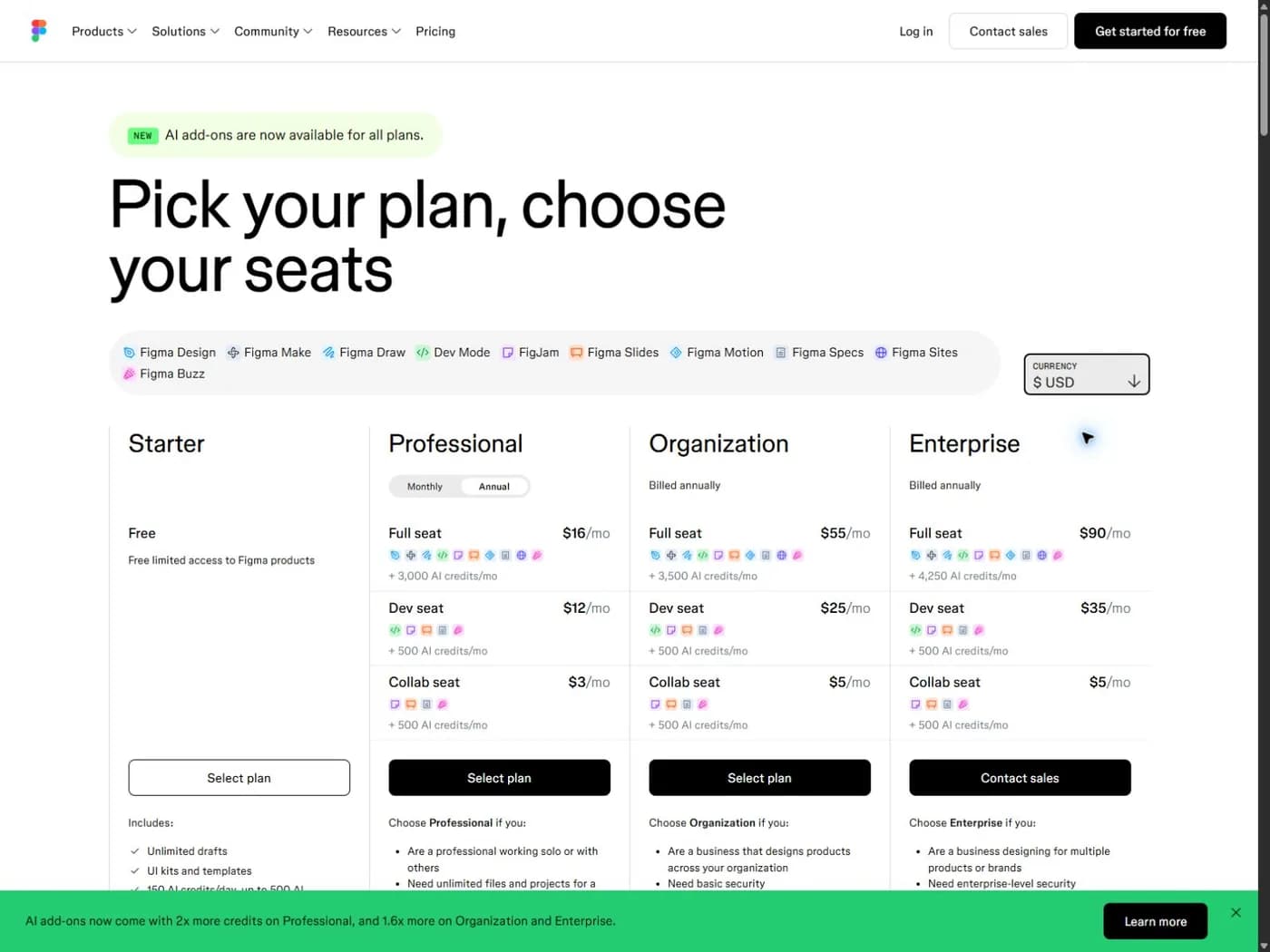
Official pricing capture, 2026-10-17. Currency and billing interval affect the amount shown.
The comparison with a $180 annual AppScreens Scale plan is not simply "$12 cheaper." The tools perform different jobs. If your team already pays for Figma for product design, its incremental screenshot software cost may be small. If repeated store exports take substantial time, a separate tool may still be worthwhile.
Build a simple internal worksheet instead of borrowing a vendor's savings claim:
| Cost item | What to record |
|---|---|
| Software | Actual plan, billing period, seats and client-use rights |
| First production pass | Hours spent on capture selection, copy and layout |
| Repeat release | Hours needed to replace one UI screen across all variants |
| Review | Time spent collecting and applying one feedback round |
| Handoff | Time needed to package files and explain future updates |
| Exceptions | Fonts, stock assets, translation and extra revision work |
Use your own timed trial for these rows. We have not measured a universal production-time advantage for any tool in this guide. For occasional projects where recurring billing is the concern, see screenshot tools without a subscription. A non-recurring payment can still cover only a limited access period.
Run a small, realistic procurement test
Do not start with your most sensitive client project. Use approved sample UI with no customer data. Build a short set that includes one long headline, one dense screen and one translated frame. These cases expose constraints faster than a gallery of attractive English templates.
Then change the source UI and update one headline. Watch what has to be repeated manually. Export the required sizes, inspect them at full resolution, and review the first frame at a small display size. An elegant desktop canvas can hide text that is unreadable in a store listing.
Finish the trial by asking another team member to update the project without verbal guidance. That handoff test reveals missing font access, unclear layer names and undocumented export steps. It is a practical quality check, not proof of higher conversion.
For a ScreenFast concept trial, start with the ScreenFast workflow guide and verify the current pricing and package scope. The free stage is an audit and creative brief; image generation is paid. Review generated text and visual details before using any result in a client delivery.
Keep release accuracy separate from visual approval
Your client can approve a beautiful screenshot that still misrepresents the app. Apple's App Review Guidelines include requirements for accurate metadata. Treat the actual product and current store requirements as constraints on the creative work.
Maintain a final release checklist that covers real UI, truthful feature claims, correct pricing language where shown, localization, readable captions, and the required image dimensions. Do not let a template's default device frame or an AI-generated detail override what the app actually does.
Store upload access is a separate permission decision. Give production systems only the access the engagement requires, and agree who submits the listing. A screenshot design subscription does not automatically authorize an agency to change a client's store account.
Methodology and limits
We reviewed public product, pricing and licensing pages on 2026-10-17 and captured the relevant AppScreens and Figma pages in a browser. The recommendations are based on documented scope and a proposed procurement test, not a paid agency benchmark or interviews with vendor customers.
Prices are the displayed US-dollar amounts and billing options described above, before any applicable tax. Plan limits and terms can change. Where project transfer, role-based approval or client-use rights were not established by the checked sources, we describe them as questions to verify rather than supported features.
Frequently asked questions
Can an agency use AppScreens Pro for paid client projects?
Do not assume so. The licence page checked for this guide distinguishes Standard use for your own organization from Extended use for paid client work. The current Scale plan includes the Extended licence. Confirm the terms for your engagement before purchase.
Is Figma always cheaper because the client already uses it?
No. Existing access can reduce incremental software cost, but file permissions, Full seats, fonts and production time still matter. Compare the actual seat arrangement and a repeat-release test rather than the headline price alone.
Should we include editable source files in every package?
Only if you can deliver a maintainable source format and your contract includes it. Define the file or project type, required subscriptions, fonts and update instructions. Final PNG delivery and editable project transfer are different deliverables.
Can we promise better conversion after redesigning screenshots?
Not from a design tool choice alone. Treat the redesign as a hypothesis and agree how it will be evaluated. Store traffic mix, offer, app quality and test design all affect the result. This guide does not claim a conversion lift for any vendor.
Is ScreenFast a replacement for an agency review portal?
We do not present it as one. ScreenFast provides a paid AI design workflow after a free audit and brief. Confirm the output and editing scope for your project; use your established client review and handoff process where needed.
What should we check first when comparing tools?
First confirm the licence covers the work you sell. Next test one realistic revision and one client handoff. Attractive templates and export counts matter, but neither compensates for missing rights or an unusable delivery process.